## What this does

The itch.io Store tab used to show only four fixed shelves. This is the
first of a series of PRs that rework it. It adds real browsing: pick an
order and a price filter, and the tab loads itch's own listing for that
choice and keeps loading as you scroll. Login, the library, downloads
and installs are unchanged.

Platform and tag filters, the game page with the install picker, updates
and collections are not in this PR. They come in the following ones.

## How it works

itch serves every listing page as an RSS feed if you add `.xml` to the
address. The app already reads those feeds for the shelves, so browsing
reuses the same parser (`ItchShelves.parse`). Nothing here needs the API
key.

The address is built the way itch builds its own links: sort, then
price, then `platform-<name>`, then `tag-<slug>`.

| Choice | Address |
|---|---|
| Popular (default) | `https://itch.io/games` |
| New & popular | `/games/new-and-popular` |
| Top sellers | `/games/top-sellers` |
| Top rated | `/games/top-rated` |
| Most recent | `/games/newest` |
| Free | `/games/free` |
| On sale | `/games/on-sale` |
| Paid | `/games/store` |
| $5 or less | `/games/5-dollars-or-less` |
| $15 or less | `/games/15-dollars-or-less` |

Choices combine, for example `/games/top-rated/free`, then `.xml` for
the feed. Page 2 and later add `?page=N`.

## Changes

**`stores/itch/ItchBrowse.kt` (new)**
- `BrowseQuery` holds sort, price, platforms and tags. The default query
is the front page, which keeps the existing shelves.
- `ItchBrowse.path` and `url` build the addresses above. Only the
spellings listed above are used. Platforms and tags are already accepted
by the builder, ready for the next PR.
- `ItchBrowse.page` loads one page of results:
- Disk cache under `cacheDir/itch-browse`, keyed by the SHA-1 of the
address, fresh for 3 hours.
  - Requests are made one at a time, at least 1.2 s apart.
  - A 429 answer waits 8 s and tries once more.
- Each request is written to the store log (address, status, number of
games).
- `ItchBrowseState` is the Compose state for the tab: the query, the
games loaded so far, and the loading, ended and failed flags. A
generation counter discards answers that arrive after the user has
changed the query. Paging skips games it has already shown.

**`ui/ItchBrowseBar.kt` (new)**
- A sort chip row and a price chip row, plus a load-more trigger at the
end of the grid.
- Chips are selectable, work with the controller (`controllerConfirm`)
and use the same glide border as the rest of the app.

**`ui/StoresPage.kt`**
- The storefront shows the chip bar for itch.io and, when a non-default
choice is active, the browse results in the existing grid instead of the
shelves.
- Games you already own are marked as owned in the results.
- Empty and failed states have their own messages.

**`stores/itch/ItchShelves.kt`**
- `open(url)` is now `internal` so browsing can reuse it.

**`stores/StoresState.kt`**
- `detailItem` also looks in the browse results for itch.io, so tapping
a result opens its detail page.

**Strings**
- 13 new strings (sort names, price names, "Load more", "Couldn't load
games"), translated in all 33 locales.

**Docs and tests**
- `docs/development/itch-browse.md` explains the address scheme, the
cache and the paging.
- `ItchBrowseTest` checks the addresses the code builds against the ones
listed above.

## Testing

I checked every address with `.xml` added, and all of them load without
errors:
- Every sort, every price filter and every platform on its own.
- Combinations: `top-rated/free`, `top-rated/on-sale`,
`top-rated/store`, `top-rated/5-dollars-or-less`,
`top-rated/free/platform-windows` and
`top-rated/free/platform-windows/tag-pixel-art`.
- Paging: `?page=2` and `top-rated.xml?page=2`.

The unit test locks those addresses in.

## Not in this PR

- Platform and tag filters in the UI, and search.
- The game page, the version picker and install for free games.
- Updates for installed games and itch collections.
- Android builds will link out to the itch.io page. Butler patching
comes last, as an add-on pack.
The sort and price chips now cover everything itch's browse page offers, with the
paths copied from its links: new-and-popular, top-sellers, top-rated and newest
for sorts; free, on-sale, store, 5-dollars-or-less and 15-dollars-or-less for
prices; platform-windows, -osx, -linux, -android, -ios, -web and -mobile-web.
The guessed alternative spelling of the free filter is gone, so a query is one
address. The tests assert the addresses itch itself uses.

New and reworded strings in all 33 locales.
droiddeck-steam-shortcuts and AddedGames.accountConfig took the account
marked "MostRecent" in loginusers.vdf, else the only userdata folder.
The arm64 client here writes no MostRecent, so with two accounts in one
install nothing was picked: no added or store game reached
shortcuts.vdf ("no signed-in account yet; nothing written") and Steam
answered their launch with "App configuration unavailable".

Without MostRecent, take the account marked AutoLogin, then the one with
the latest timestamp. Both sides use the same order so the app reads the
config the guest script writes.
The Store tab only had four fixed shelves and a title search. A row of sort
(Popular, New, Top rated, Top sellers) and price (Any, Free, On sale) chips now
sets a BrowseQuery; anything but the defaults swaps the shelves for that query's
games, loaded page by page as the grid scrolls.

ItchBrowse builds itch's listing-feed URL (platform and tag segments are in the
builder for the next change), tries each spelling of a price filter until one
answers, spaces requests 1.2 s apart, backs off once on a 429, and keeps pages
in the app cache for three hours. Every request is logged with its status and
game count so a wrong URL guess can be fixed from a device. Owned games replace
their browse copy so Install and the owned markers are right, and the detail
page finds browse results.

Strings for all 33 locales; URL-builder tests; docs/development/itch-browse.md.
Steam installs Proton EasyAntiCheat Runtime (1826330) and Proton BattlEye Runtime (1161040) as tool depots. The launcher's Games tab and the desktop's game entries now skip them like the other runtimes.
The content log was read with RandomAccessFile.readLine, one byte per read, on the main thread. A 4 MB log took about 2 s on the first poll, enough for an ANR on slower devices while a download runs. It is now read through a buffered reader with the same Latin-1 lines and offset, and the per-line regexes only run on lines that can match.
Games the Epic client installed now carry their LaunchCommand arguments too, split by a new launch.split op. A doubled quote inside a quoted argument is one literal quote, and an install with a version ignores a manifest without the same build.
The manifest's arguments apply only when its build matches the installed version, only arguments the merge inserted are tracked as its own, escaped quotes split like a Windows command line, and the REDprelauncher rule needs Cyberpunk2077.exe beside it.
Feature level 12_2 makes vkd3d-proton report mesh shaders and ray tracing that Turnip doesn't provide. Caravan SandWitch (Unreal Engine 5) then builds mesh shader pipelines without a pipeline layout and the driver crashes; Cyberpunk 2077 stops at ray tracing initialization. Only these two games get 12_1, and a value set in a game's own settings still wins.
Epic manifests carry a launch command next to the launch executable, which the Epic launcher passes to the game. It was read and dropped, so Caravan SandWitch never got -PCStore=EGS and quit with "started outside of any known PC store". The manifest's launch command now joins the game's arguments, including for games already installed.
The redistributable seeder marked every process in a game's install scripts as already run, so the Ubisoft Connect installer that Ubisoft games list was skipped and they stopped with "Unable to locate Uplay PC". It is now left to run like the Vulkan runtime installer, and a marker an earlier seeding wrote is taken back out.
A user's first Steam setup never finished on an Honor Pad (Snapdragon 6
Gen 1, metered Wi-Fi with a 14 Mbit/s link). Their log stops at
`downloading Steam: bins_linuxarm64_linuxarm64 (2/17)`. The log was
shared 31 s into the session, so nothing had failed yet. The way the
download works explains why it never got further.

## Why

- **The session pauses the download.** With the default background
behavior (Manual), a session pauses as soon as DroidDeck is hidden or
the screen turns off. In the user's log that happened one second after
start, before the download had begun.
- "Keep downloads running" doesn't help. It's off by default, and it
only recognizes Steam's own game downloads, not the runtime fetching the
client.
- A first run shows nothing for minutes, so leaving the app or letting
the screen time out is exactly what people do.
- **The download is bigger than the screen says.** The client is about
360 MB in 17 parts, and part 2 alone is 110 MB. The loading screen said
"~1-2 min" and counted parts, not bytes, so on a slow link it looks
frozen at about 5%.
- **Nothing handles a bad connection.** Each part was a plain `curl
-fsSL` with no timeout, no retry and no progress output.
  - A stalled connection could wait forever.
- A failed one ended the session and threw away everything fetched, so
the next try started from part 1.

## What changes

- **`droiddeck-steam-install`**:
- Parts go to `package/droiddeck-download` and stay there until the
client is installed.
  - Each part resumes from the bytes on disk (`curl -C -`).
  - A transfer under 4 KB/s for a minute is dropped and resumed.
- Attempts that make no progress back off 5–30 s, then give up with a
clear error. Whatever arrived is kept.
  - A finished part is marked unpacked, so a later session skips it.
- Bytes that fail their checksum are fetched whole again. A server that
won't resume starts the part over. Parts left over from another client
version are dropped.
- A repair redoes every part once, and keeps what an interrupted repair
already redid.
- Every 5 s the step line also carries megabytes overall: `… (2/17), 45
of 360 MB`.
- **Loading screen** (`LoadingState`): shows `Downloading the Steam
client · 45 / 360 MB`, with the bar following the bytes. Older runtimes
still show the part name.
- **`SessionService`**: until the session's first frame, the download
watch also checks whether the client is still to be fetched (no install
stamp or client binary, or a repair requested). While it is:
- the session stays awake with its wake and Wi-Fi locks, whatever the
downloads setting says;
  - the notification shows "Steam download active" with **Suspend now**;
  - a `steam.client_download` event marks start and end.
- The watch is set up before the first suspend decision, so a session
started with the screen off isn't paused first. Once the client is
there, the chosen behavior applies again.
- **`droiddeck-session`**: the step no longer promises 1–2 minutes.

## Testing

- `python3 -m unittest discover -s tools/tests -p 'test_*.py'`: 497 OK,
1 skipped.
- `test_steam_install.py` gets a fake curl that drops connections,
refuses to resume or fails on cue.
- New cases cover: megabyte progress; resuming after a dropped
connection; keeping finished and partial parts across a failed session;
restarting a part the server won't resume; re-fetching bad bytes;
dropping another version's parts; a repair resumed once.
- Kotlin: `:app:testDebugUnitTest --tests
'com.droiddeck.launcher.session.*'` passes. That includes the new
`LoadingStateTest` and the `clientInstallPending` cases in
`SteamDownloadMonitorTest`.
- RedMagic NP06J, with Background behavior set to Manual and "Keep
downloads running" off (the user's settings), and a client repair
requested:
- Started Steam and sent DroidDeck to the background straight away. The
client download stayed active for 30 s with no pause, and all 360 MB
arrived. Then the session paused as Manual should.
- Stopped a second repair during part 2. Part 1 was marked unpacked, the
110 MB part 2 was kept, and the repair marker stayed.
- Started again: it resumed at 110 of 360 MB, unpacked part 2 without
fetching it again, finished, and Steam started normally.
- The loading screen showed `Downloading the Steam client · 248 / 360
MB`.

Retested 2026-10-23 on the REDMAGIC tablet after merging main, which
brought in the stable-channel fallback. Background behavior was set to
Manual with "Keep downloads running" off. A client repair was forced,
then Home was pressed right after Start:

| Build | Session while hidden | Client download |
|---|---|---|
| main | suspended 1 s after Home | stuck at part 3/17 after 90 s |
| this PR | kept awake until the client was in | all 17 parts, 362 MB in
46 s with MB progress; suspended once done |

`tools.tests.test_steam_install` (22), `SteamDownloadMonitorTest` and
`LoadingStateTest` pass.

## Not changed

- **The download is the plain zips.** Valve's manifest also lists `.vz`
(LZMA) versions, 228 MB instead of 360 MB. Using them needs a VZ decoder
in the guest; that could be a follow-up.
- **The stall and retry path** is covered by the tests but wasn't forced
on the device.
A game started from another launcher (ES-DE, a `droiddeck://game/` link,
a pinned shortcut) should send the player back to that launcher when it
closes. Instead DroidDeck always opened the Android home screen, which
is a different place whenever that launcher isn't the default Home app.

## Cause
The link is handled by `FrontEndActivity`, which starts the session in
its own task and stays behind it in a second DroidDeck task. When the
session ended, DroidDeck started `CATEGORY_HOME` to cover that leftover
task, so the player always landed on the system Home.

## Fix
When a link-launched session ends, `SessionActivity` removes the task
that handled the link (a `FrontEndActivity` task whose base intent is a
game link), then removes its own task. Android then shows whatever was
underneath: ES-DE, any other app that launched the game, or Home when
Home launched it.

Sessions started from DroidDeck's own Games tab are unchanged.

## Testing
On a REDMAGIC NP06J, with the `droiddeck://game/945360` link started
using ES-DE's flags (`NEW_TASK | CLEAR_TASK`). Among Us was closed and
"Return to launcher after a game" was on.

| Launched from | main | this branch |
|---|---|---|
| Calculator (stands in for a non-Home frontend) | Android home |
Calculator |
| Home | Android home | Android home |
| DroidDeck's Games tab | DroidDeck | DroidDeck |

## Credits
Reported on Discord by whatsupbros.
## Summary

Since 0.5.0, Snapdragon 8 Gen 2 devices (Retroid Pocket 6, Galaxy S23,
AYN Thor) pin the Steam client, its UI helper and gamescope to the
single prime core whenever the core settings were never touched. The
Steam menu and overlay lag on those devices, and games launched from
Steam get CPU-starved.

This drops that default, so 8 Gen 2 behaves like 0.4.0 and every other
chip: Android schedules Steam on all cores. Core choices users saved in
Performance are kept, and the all-core restore for games launched from a
pinned Steam client stays.

## Evidence

The device reports attached to both bug reports show the default in
effect:

| Device | SoC | Client core override | Client cores |
|---|---|---|---|
| Retroid Pocket 6 | QCS8550 | true (never set) | 7 |
| Galaxy S23 | SM8550 | true (never set) | 7 |

Both reporters say 0.4.0, which left Steam on all 8 cores, was smooth.
The PR that added the default did not benchmark it.

Tablet bench (REDMAGIC, SM8850): the 8 Gen 2 default was reproduced by
pinning Steam to one prime core (7) and games to cores 0-3. The test
scrolls the Big Picture library with the d-pad for 20 s and records
frame pacing. Two runs each:

| Steam client | UI fps | 1% low | p99 frame | off-cadence |
|---|---|---|---|---|
| all cores (this PR) | 114.4 / 115.2 | **62.5 / 62.5** | 16 ms | 4.7 /
4.0 % |
| one core (old default) | 109.7 / 110.9 | 41.7 / 41.7 | 24 ms | 8.0 /
7.0 % |

Among Us ran the same either way (58.9 vs 59.0 fps).

## Tests

`CoreAllocationPrefsTest`: absent preferences leave every core to the
scheduler, and saved choices are kept.

## Credits

- shanume (RP6) and Kacper (S23): reports, and the 8-cores-vs-1 finding.
- Kurt Himebauch (#654): the core allocation work this keeps, apart from
the default.
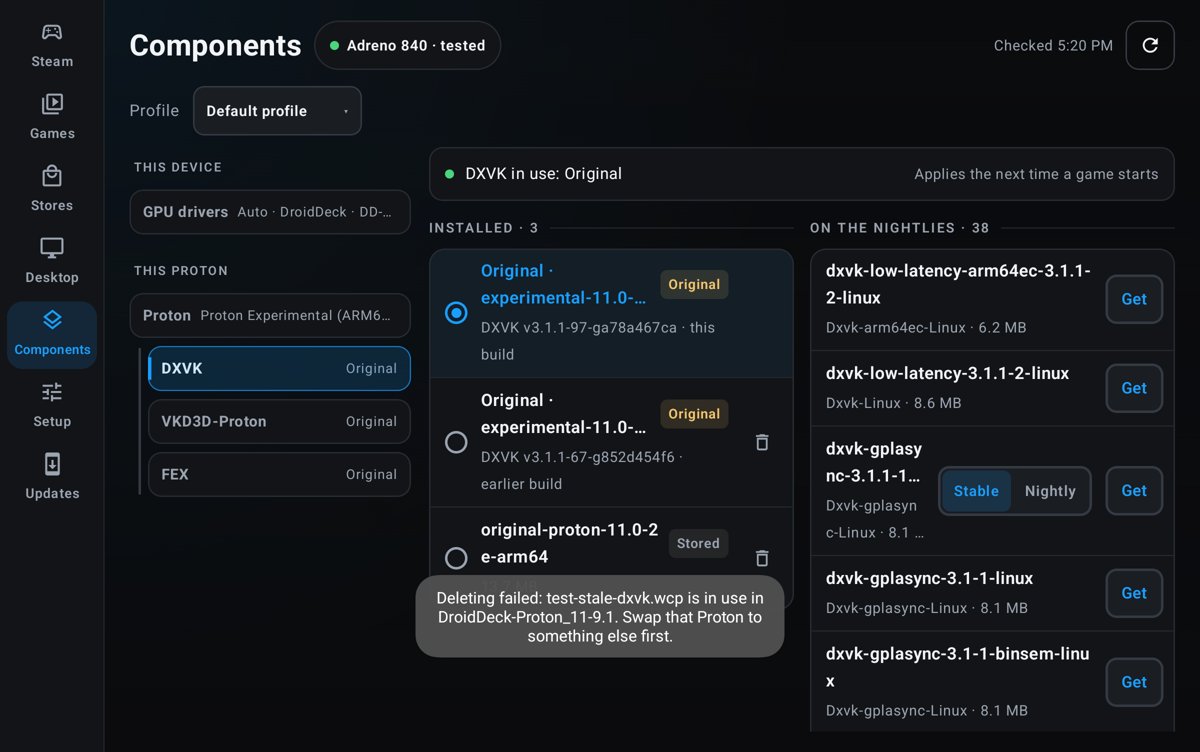
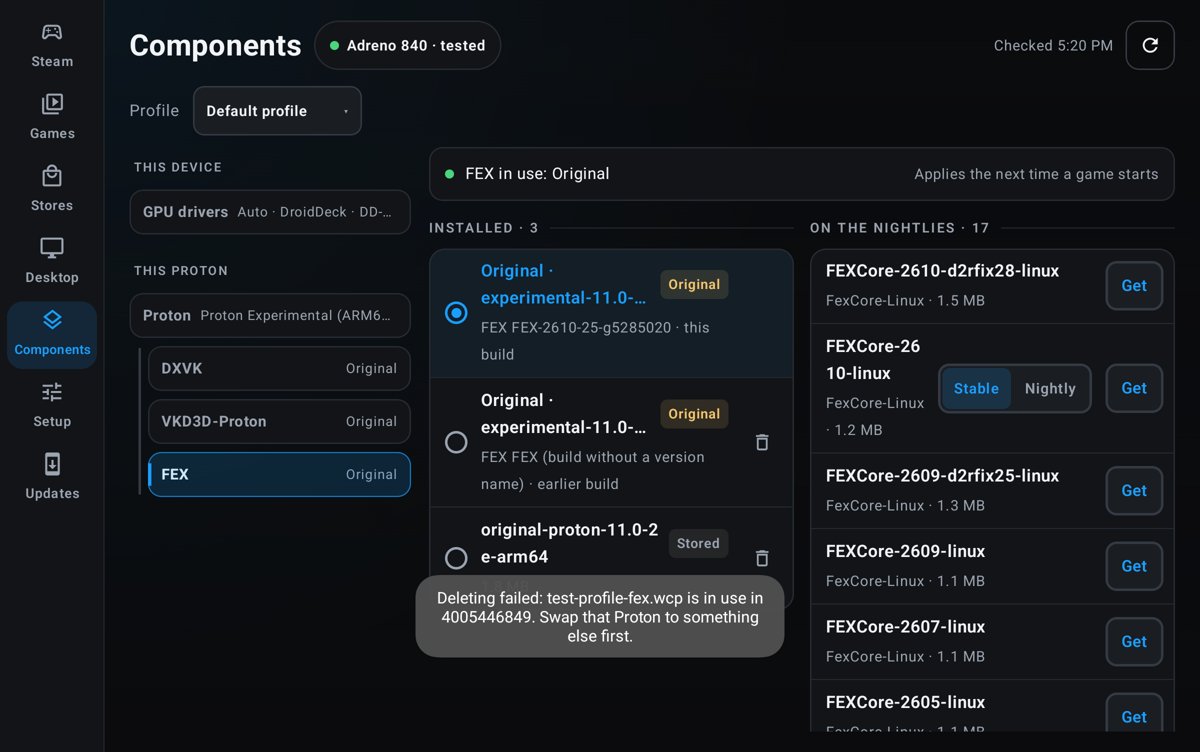
After a Proton update, stored DXVK / VKD3D / FEX packages can't be
deleted. Components says they're "in use" by a Proton that's gone
(`DroidDeck-Proton_11-9.1` after updating to 11-11.1) or by a bare
number (`4005446849`).

## Cause
`deletePackage` and the Storage page's in-use check count every recorded
selection:
- **Removed Protons:** swaps on Protons that are no longer installed.
- **Out-of-date swaps:** swaps from before the Proton's version changed.
The launcher already ignores these.
- **Game profiles:** a per-game pick blocked the delete with the "swap
that Proton" message, naming the game's id.

## Fix
- **Out-of-date selections:** a selection only counts while its Proton
is installed and at the version the swap was made on. That's the rule
launches already use. Deleting a package removes its stale entries.
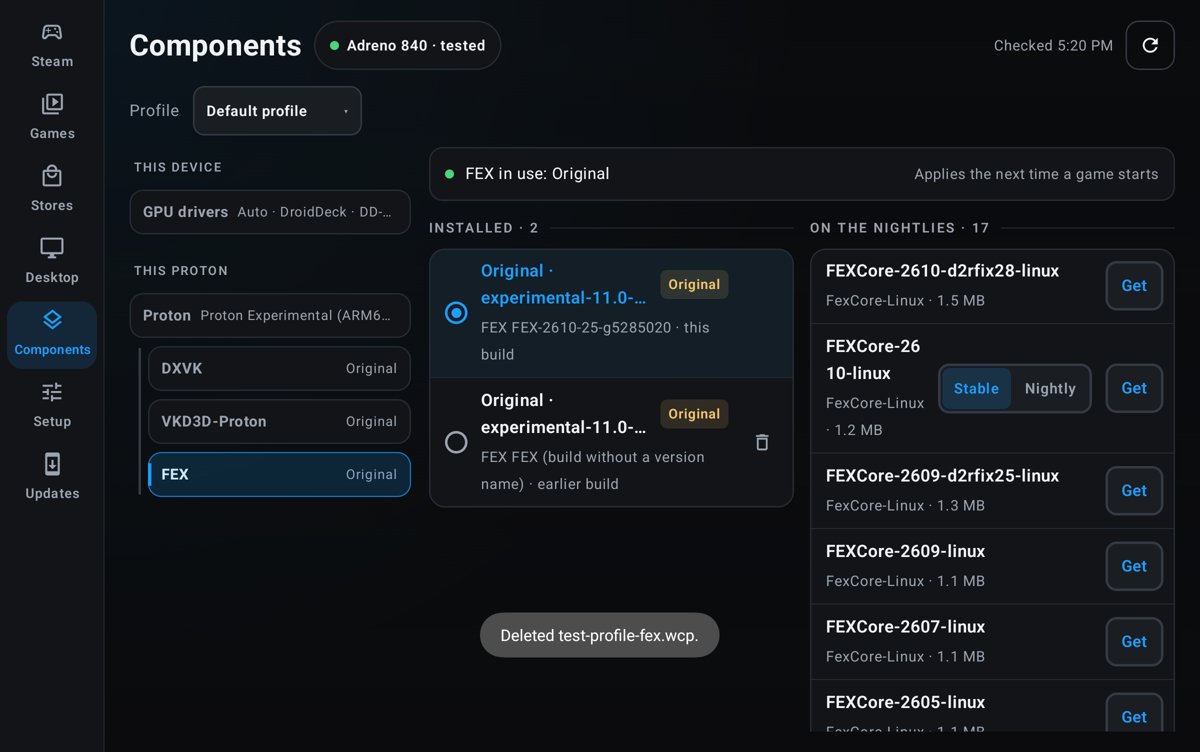
- **Profile picks:** deleting a package also clears it from any game's
component profile, so those games go back to the Proton's own copy.
Storage cleanup still keeps profile picks.
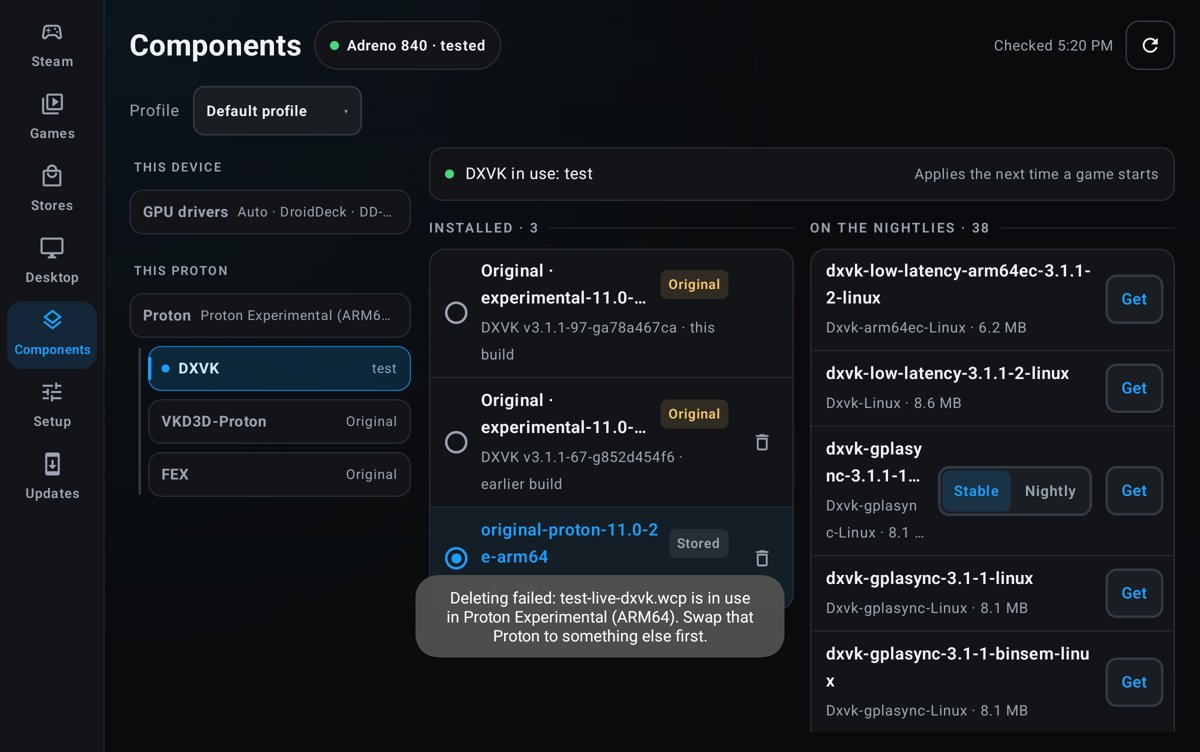
- **Live swaps:** a package swapped into an installed Proton is still
blocked. The message now shows the Proton's name rather than its id.

No new strings.

## Testing
On a REDMAGIC NP06J, with the state from the reports recreated:

| Case | main | this branch |
|---|---|---|
| DXVK swapped into a removed `DroidDeck-Proton_11-9.1` | Deleting
failed: in use in DroidDeck-Proton_11-9.1 | Deleted, stale entry removed
|
| FEX picked in game profile `4005446849` | Deleting failed: in use in
4005446849 | Deleted, profile cleared |
| DXVK swapped into installed Proton Experimental | blocked | blocked:
in use in Proton Experimental (ARM64) |

<img
src="https://raw.githubusercontent.com/maxjivi05/DroidDeck/pr-media/1434/main-stale-proton.jpg"
width="420"> <img
src="https://raw.githubusercontent.com/maxjivi05/DroidDeck/pr-media/1434/main-game-profile.jpg"
width="420">
<img
src="https://raw.githubusercontent.com/maxjivi05/DroidDeck/pr-media/1434/fix-game-profile.jpg"
width="420"> <img
src="https://raw.githubusercontent.com/maxjivi05/DroidDeck/pr-media/1434/fix-live-blocked.jpg"
width="420">

`ComponentsSelectionTest` covers removed, out-of-date and live
selections.

## Credits
Reported on Discord by Siigonis, Bado and woodrow1712.
 MaxsTechReview