mirror of
https://github.com/Droid-Deck/DroidDeck.git
synced 2026-11-18 20:36:04 +00:00

173 lines
13 KiB
Markdown
173 lines
13 KiB
Markdown
# DroidDeck 0.2.0 (beta)
|
||
|
||
**Valve's native ARM64 Steam client on your Android handheld.** Windows games run through Valve's ARM64 Proton and FEX, and an optional Linux desktop brings emulators along.
|
||
|
||
|
||
|
||
**Needs:** Android 9+, Adreno 730 or newer (or 8xx), ~3 GB free for the runtime (+1.1 GB for Desktop & apps).
|
||
|
||
This is the first release from the [Droid-Deck](https://github.com/Droid-Deck) org, so it covers everything DroidDeck does, not just what changed since 0.1.7. `legacy#N` links go to pull requests in [The412Banner/DroidDeck](https://github.com/The412Banner/DroidDeck), from before the move.
|
||
|
||
---
|
||
|
||
## Highlights
|
||
|
||
### Steam, running natively
|
||
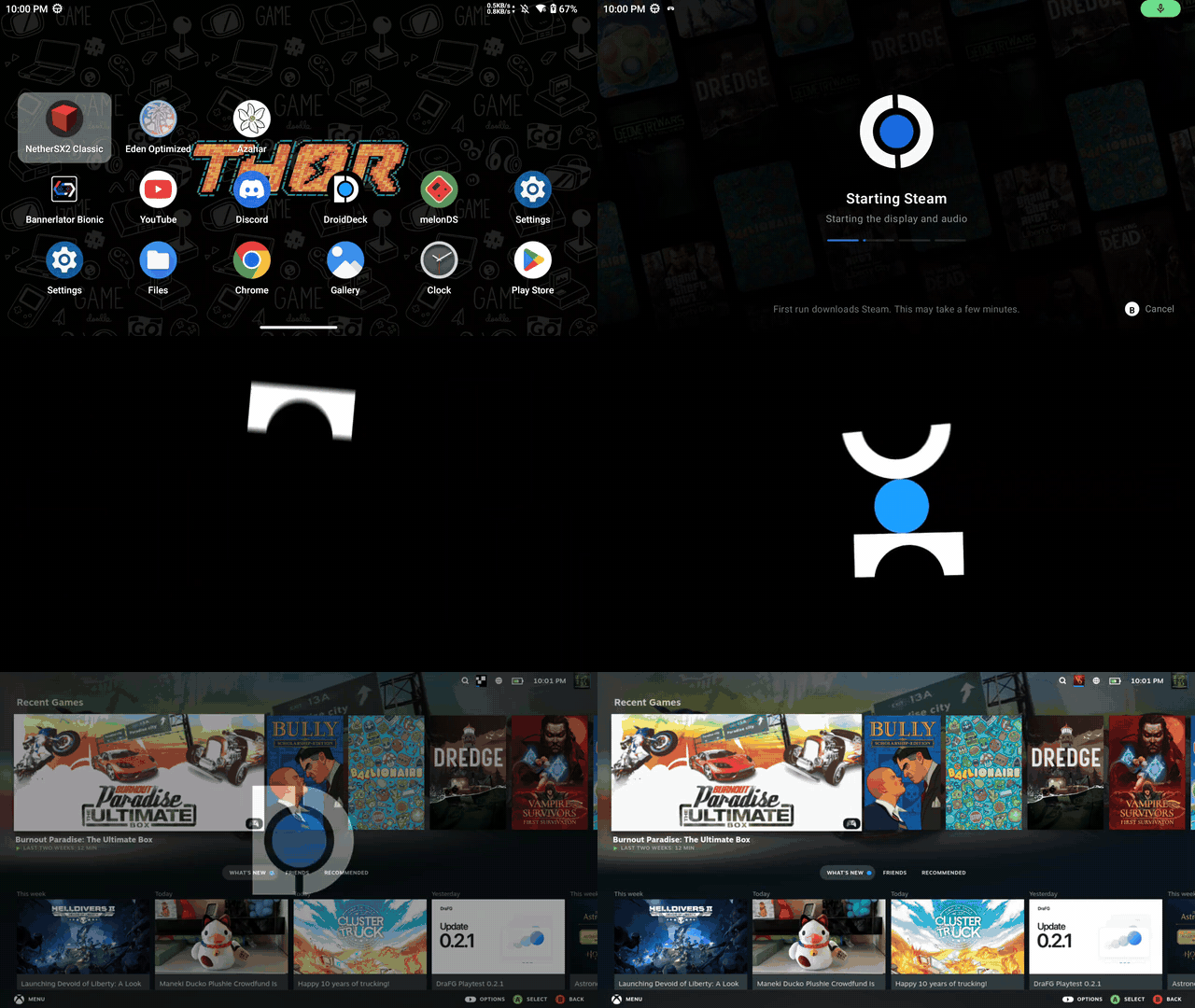
The real Steam client in Big Picture, fetched from Valve on your device. Turn on **Run Steam when DroidDeck starts** and the app icon takes you straight in, as above.
|
||
|
||
### A launcher made for handhelds
|
||
Your Steam library as a capsule wall, and a Games tab with per-game settings.
|
||
|
||
<p>
|
||
<img src="https://raw.githubusercontent.com/Droid-Deck/DroidDeck/main/docs/releases/media/0.2.0/launcher-steam.jpg" width="49%" alt="Steam tab with the capsule wall">
|
||
<img src="https://raw.githubusercontent.com/Droid-Deck/DroidDeck/main/docs/releases/media/0.2.0/launcher-games.jpg" width="49%" alt="Games tab with a game's launch settings">
|
||
</p>
|
||
|
||
### Your Android home screen
|
||
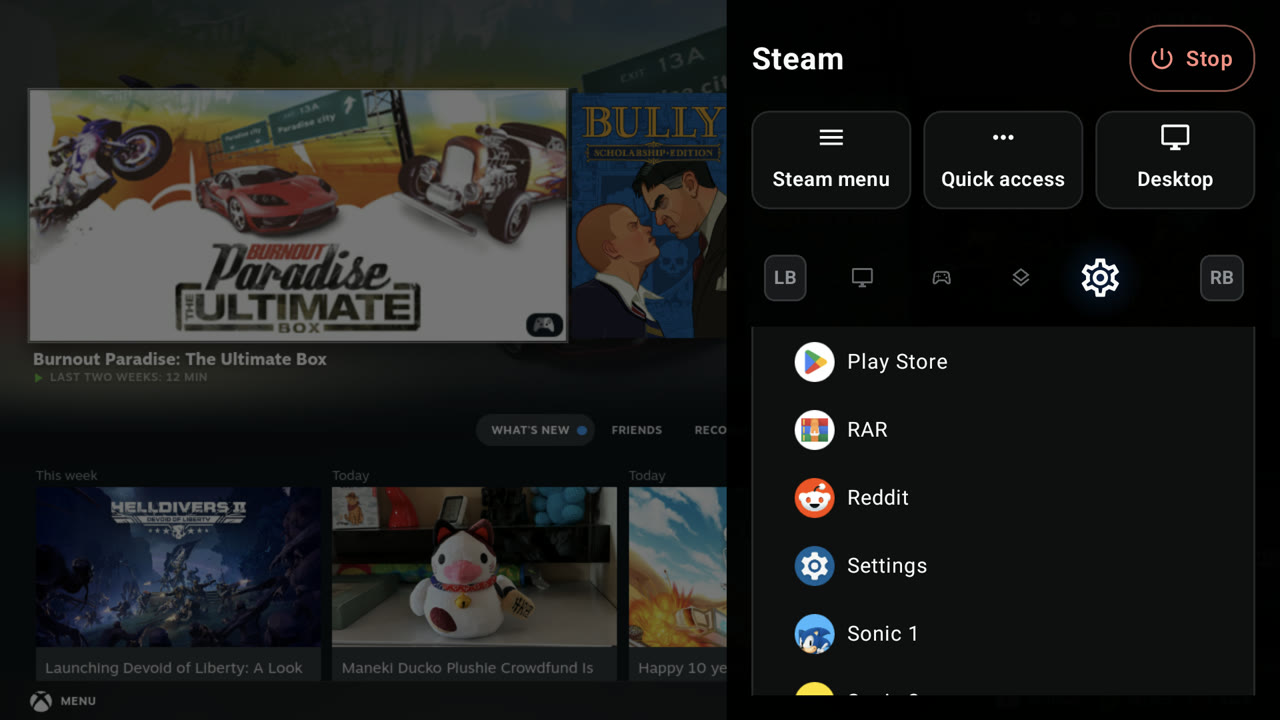
Set DroidDeck as the Home app and your Android apps live in the launcher too, and in the session menu, so you can open one without leaving your game.
|
||
|
||
|
||
|
||
### Made for two screens
|
||
On a dual-screen handheld, launch an Android app on the second screen while Steam keeps the first, or turn the second screen into a keyboard and trackpad, or a Linux terminal.
|
||
|
||
<p>
|
||
<img src="https://raw.githubusercontent.com/Droid-Deck/DroidDeck/main/docs/releases/media/0.2.0/dual-screen-app.gif" width="32%" alt="Launching Geometry Wars 3 on the second screen from the session menu">
|
||
<img src="https://raw.githubusercontent.com/Droid-Deck/DroidDeck/main/docs/releases/media/0.2.0/second-screen-trackpad.gif" width="32%" alt="Second screen as a trackpad and keyboard">
|
||
<img src="https://raw.githubusercontent.com/Droid-Deck/DroidDeck/main/docs/releases/media/0.2.0/second-screen-terminal.jpg" width="32%" alt="Second screen as a Linux terminal under Big Picture">
|
||
</p>
|
||
|
||
### A session menu over any game
|
||
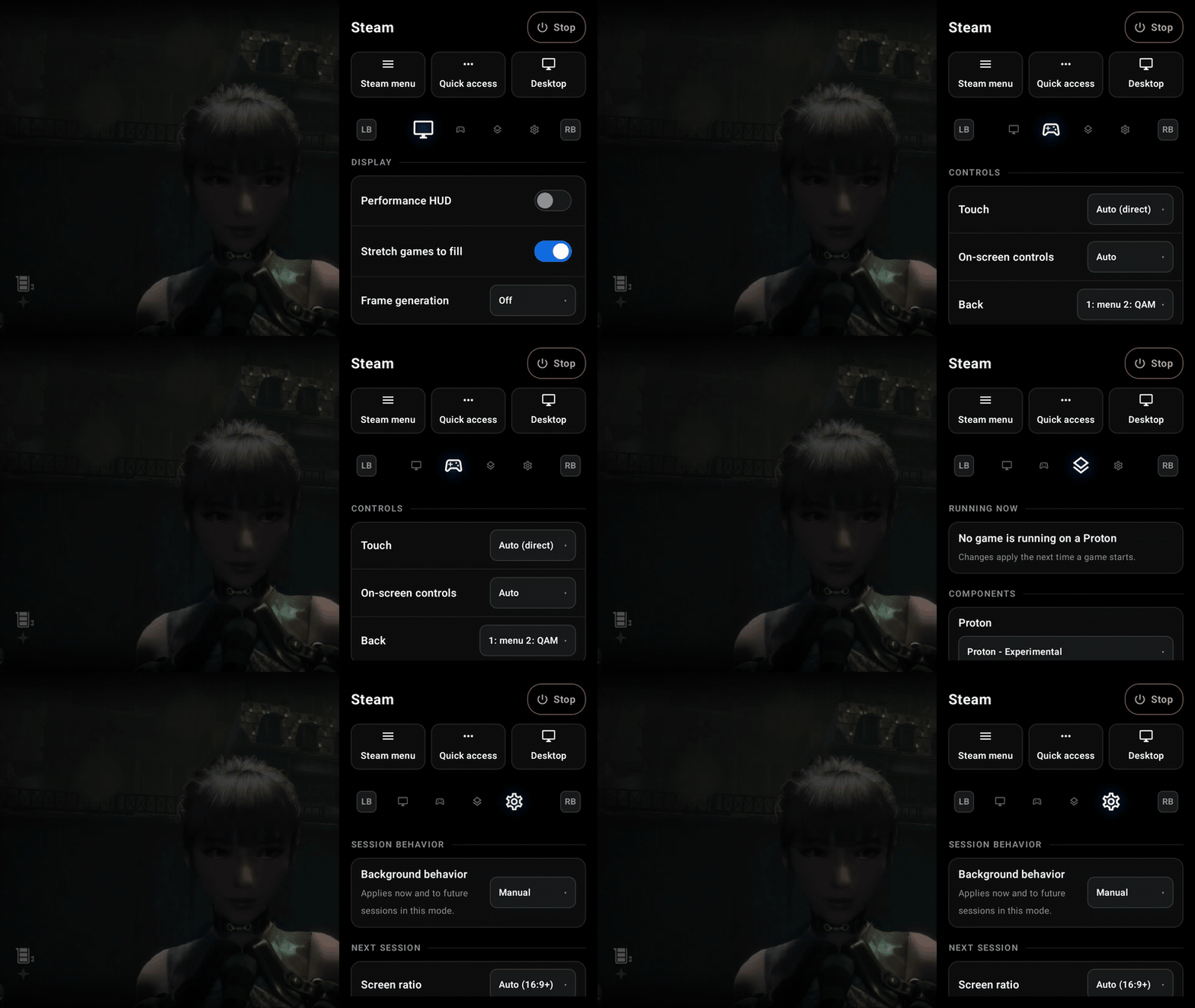
Press Back mid-game for display, controls, components and session settings, paged with LB/RB.
|
||
|
||
|
||
|
||
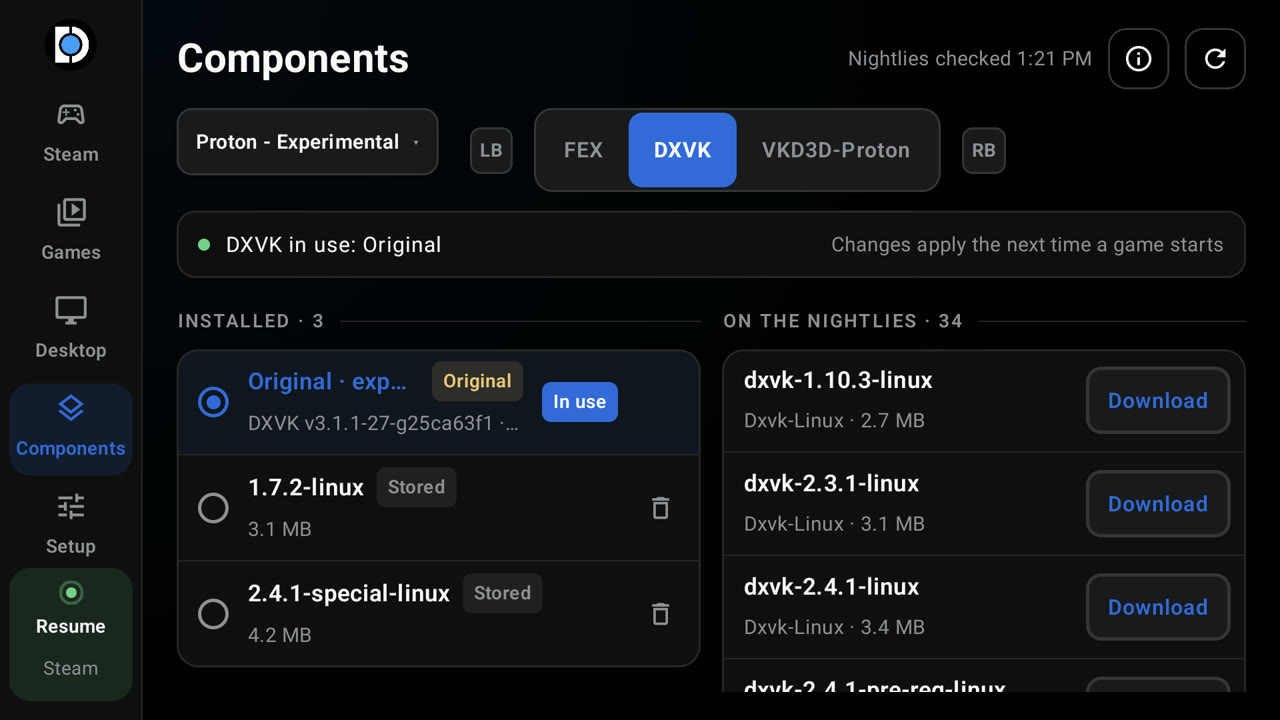
### Swap FEX, DXVK and VKD3D-Proton per Proton build
|
||
Download from the nightlies or import a `.wcp`, and see what the running game is using.
|
||
|
||
|
||
|
||
### A Linux desktop, with emulators one tap away
|
||
LXQt on the GPU, plus RPCS3, ARMSX2, Dolphin, DuckStation, melonDS, Cemu, PPSSPP and RetroArch.
|
||
|
||
<p>
|
||
<img src="https://raw.githubusercontent.com/Droid-Deck/DroidDeck/main/docs/releases/media/0.2.0/linux-desktop.jpg" width="49%" alt="LXQt desktop with a file manager and terminal">
|
||
<img src="https://raw.githubusercontent.com/Droid-Deck/DroidDeck/main/docs/releases/media/0.2.0/desktop-apps.jpg" width="49%" alt="Desktop tab with emulators to install">
|
||
</p>
|
||
|
||
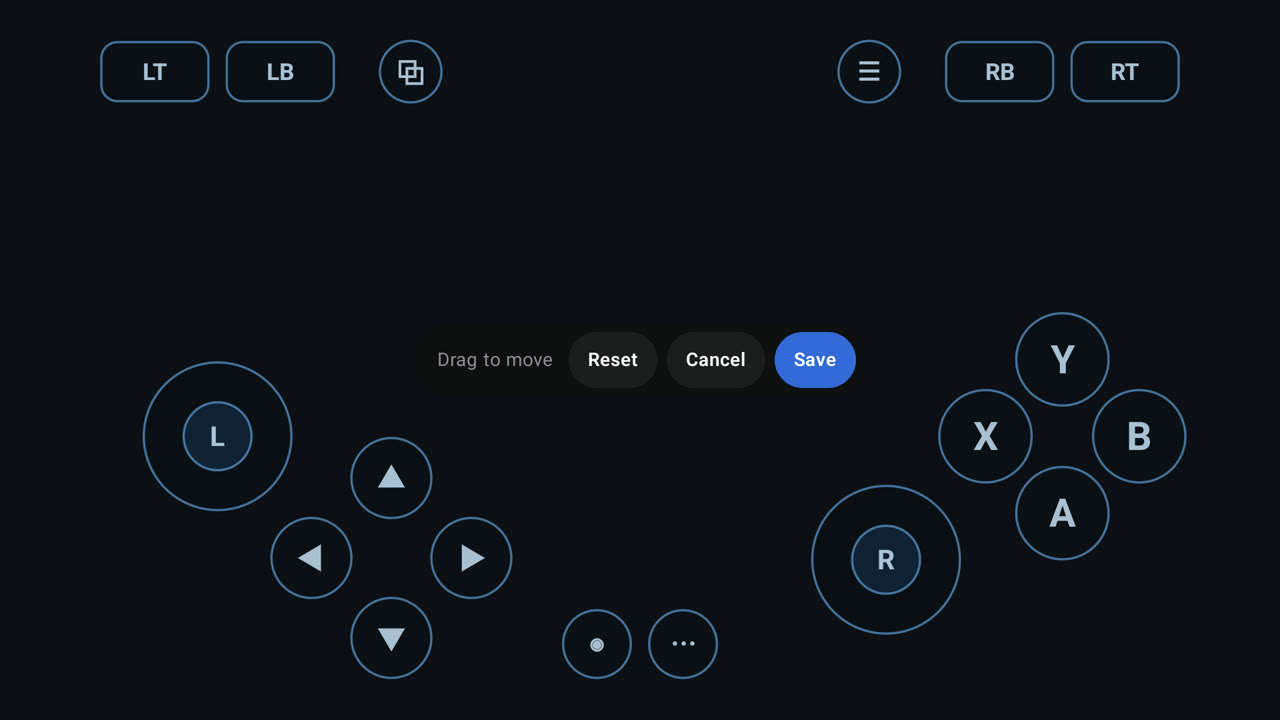
### On-screen controls you can lay out yourself
|
||
Drag every button where your thumbs want it, with adaptive sticks and phone-sized layouts.
|
||
|
||
|
||
|
||
---
|
||
|
||
## Everything in 0.2.0
|
||
|
||
### Steam
|
||
|
||
- Native ARM64 Steam client under gamescope, on DroidDeck's own Vulkan compositor (@The412Banner)
|
||
- Valve's ARM64 Proton and FEX, ready at first sign-in (@The412Banner, [legacy#22](https://github.com/The412Banner/DroidDeck/pull/22), #33)
|
||
- Start offline after one sign-in (@The412Banner)
|
||
- Steam Deck mode: battery and NIS in Quick Access, MangoHud overlay (@The412Banner, [legacy#9](https://github.com/The412Banner/DroidDeck/pull/9), [legacy#16](https://github.com/The412Banner/DroidDeck/pull/16))
|
||
- Games from your own folders appear in Steam, with store art (@The412Banner, [legacy#9](https://github.com/The412Banner/DroidDeck/pull/9))
|
||
- Components manager for FEX, DXVK and VKD3D-Proton, applied on every launch (@The412Banner, #29)
|
||
- GE-Proton and proton-cachyos as extra compatibility tools (@The412Banner, @xXJSONDeruloXx, [legacy#18](https://github.com/The412Banner/DroidDeck/pull/18))
|
||
- FEX presets per session, Stability to Extreme + TSO (@The412Banner)
|
||
- Decky Loader, with plugins in Big Picture (@xXJSONDeruloXx, #16)
|
||
- Steam's Internet settings and connection indicator work (@maxjivi05)
|
||
- Steam sees the device as "DroidDeck" (@xXJSONDeruloXx, #15)
|
||
- Steam launchers on the Linux desktop (@The412Banner, #10)
|
||
- DroidDeck startup movie, and optionally straight into Steam when the app opens (@xXJSONDeruloXx, #25, #27, #36, #38)
|
||
|
||
### Launcher
|
||
|
||
- Side rail, Games tab, capsule wall, graphite theme, controller hints, phone layouts (@xXJSONDeruloXx, #13, #35, #41)
|
||
- Launch buttons flood into the loading screen (@xXJSONDeruloXx, #46)
|
||
- Game files and Proton prefix shortcuts on each game's page (@xXJSONDeruloXx, #39)
|
||
- Controller navigation everywhere, remembered across the rail (@The412Banner, [legacy#29](https://github.com/The412Banner/DroidDeck/pull/29), [legacy#34](https://github.com/The412Banner/DroidDeck/pull/34), [legacy#38](https://github.com/The412Banner/DroidDeck/pull/38))
|
||
- Built-in file manager, a ROMs folder anywhere (SD cards too), app files in Android's picker (@The412Banner, [legacy#41](https://github.com/The412Banner/DroidDeck/pull/41))
|
||
- Themes and the split-D logo (@The412Banner, @xXJSONDeruloXx, [legacy#4](https://github.com/The412Banner/DroidDeck/pull/4), [legacy#37](https://github.com/The412Banner/DroidDeck/pull/37), #34)
|
||
- Use DroidDeck as your Android home app, with Android apps in the front end (@xXJSONDeruloXx, @The412Banner, [legacy#17](https://github.com/The412Banner/DroidDeck/pull/17), [legacy#44](https://github.com/The412Banner/DroidDeck/pull/44))
|
||
- Build identity and latest-build link in the top bar (@xXJSONDeruloXx, [legacy#24](https://github.com/The412Banner/DroidDeck/pull/24), #26)
|
||
|
||
### Sessions
|
||
|
||
- Sessions keep running when you leave the app (@The412Banner)
|
||
- Pause policy (Auto, Manual, Never), changeable mid-session, audio recovers after a pause (@xXJSONDeruloXx, [legacy#7](https://github.com/The412Banner/DroidDeck/pull/7), #14)
|
||
- Paged session menu with Display, Controls and Settings tabs (@xXJSONDeruloXx, @The412Banner, [legacy#40](https://github.com/The412Banner/DroidDeck/pull/40), #6, #24)
|
||
- Back opens the menu; a double press opens Steam's Quick Access (@xXJSONDeruloXx, [legacy#3](https://github.com/The412Banner/DroidDeck/pull/3), [legacy#20](https://github.com/The412Banner/DroidDeck/pull/20))
|
||
- First run sets itself up from the loading screen (@The412Banner, [legacy#12](https://github.com/The412Banner/DroidDeck/pull/12), [legacy#15](https://github.com/The412Banner/DroidDeck/pull/15))
|
||
- Launch on any connected display; a second screen can be a keyboard, trackpad or terminal (@xXJSONDeruloXx, [legacy#13](https://github.com/The412Banner/DroidDeck/pull/13), [legacy#33](https://github.com/The412Banner/DroidDeck/pull/33))
|
||
- Share session logs from the app or the ended-session screen (@xXJSONDeruloXx, @The412Banner, [legacy#11](https://github.com/The412Banner/DroidDeck/pull/11), #17, #41)
|
||
|
||
### Controls
|
||
|
||
- Any controller shows up as an Xbox 360 pad; an on-screen pad fills in when none is connected (@The412Banner)
|
||
- On-screen controller editor with adaptive sticks (@maxjivi05, #9)
|
||
- On-screen sticks that use the letterbox bars, plus Steam and QAM touch buttons (@The412Banner, @xXJSONDeruloXx, [legacy#6](https://github.com/The412Banner/DroidDeck/pull/6))
|
||
- Real touch in Big Picture; a desktop touchpad that hovers, clicks, scrolls and two-finger drags (@The412Banner, #10, #22)
|
||
- Cursor shapes, hidden while you play on a pad (@The412Banner, #18)
|
||
- Soft keyboard and a full PC keyboard (@The412Banner, [legacy#25](https://github.com/The412Banner/DroidDeck/pull/25))
|
||
|
||
### Display and performance
|
||
|
||
- Frame generation: built-in Win-FG, or LSFG from your own Lossless Scaling, 2×–4× (@The412Banner)
|
||
- Import or download Turnip drivers per mode, from Banners-Turnip and WinNative (@The412Banner)
|
||
- Resolution and shape per mode, including "Exactly this panel" for 4:3 and 3:2 screens (@The412Banner, [legacy#14](https://github.com/The412Banner/DroidDeck/pull/14))
|
||
- Stretch games to fill; Quake-engine games windowed to fit (@The412Banner, [legacy#32](https://github.com/The412Banner/DroidDeck/pull/32))
|
||
- HDR10 on supported panels (experimental) (@The412Banner)
|
||
- Runs as a game on Android: sustained performance, fastest panel mode, ADPF hints (@The412Banner)
|
||
- Steam's interface stays on the GPU (@maxjivi05)
|
||
- Pin Steam and games to chosen CPU cores (@The412Banner)
|
||
- Faster proot with WinNative's seccomp and tracing fixes (@maxjivi05, #4, #37)
|
||
|
||
### Desktop and emulators
|
||
|
||
- LXQt on labwc, on the GPU with Vulkan by default (@The412Banner, [legacy#25](https://github.com/The412Banner/DroidDeck/pull/25))
|
||
- Emulators downloaded on request: RetroArch, PPSSPP, RPCS3, DuckStation, ARMSX2, Dolphin, melonDS, Cemu and more (@The412Banner)
|
||
- Emulator games launch full screen from the front end, one tile per disc, with box art (@The412Banner, [legacy#29](https://github.com/The412Banner/DroidDeck/pull/29), [legacy#34](https://github.com/The412Banner/DroidDeck/pull/34), [legacy#38](https://github.com/The412Banner/DroidDeck/pull/38))
|
||
- ARMSX2 replaces PCSX2 for PS2: 60 fps where PCSX2 managed 17 (@The412Banner, [legacy#26](https://github.com/The412Banner/DroidDeck/pull/26))
|
||
- Dolphin, melonDS and Cemu set up out of the box (@The412Banner, #10, #18, #42)
|
||
- Emulator controllers preconfigured, and RPCS3 shader fixes (@The412Banner, [legacy#25](https://github.com/The412Banner/DroidDeck/pull/25))
|
||
|
||
### Audio
|
||
|
||
- DirectAudio for games, straight to Android (@The412Banner, [legacy#9](https://github.com/The412Banner/DroidDeck/pull/9), [legacy#11](https://github.com/The412Banner/DroidDeck/pull/11))
|
||
- Microphone for voice chat, on by default (@The412Banner, [legacy#11](https://github.com/The412Banner/DroidDeck/pull/11))
|
||
|
||
### Fixed
|
||
|
||
- Steam updates failing on read-only files (@The412Banner, #33)
|
||
- A dropped finger-up blocking later touches (@The412Banner, #22)
|
||
- Stopped sessions leaving stray processes and log spam (@The412Banner, #43)
|
||
- Cemu and shadPS4 crashing on the input shim; no cursor on the GPU desktop (@The412Banner, #42)
|
||
- Leftovers from crashed or killed sessions cleaned up at the next start (@The412Banner, [legacy#16](https://github.com/The412Banner/DroidDeck/pull/16))
|
||
- The menu's dim layer staying over Steam after switching apps (@xXJSONDeruloXx, #45)
|
||
- Steam library capsule art (@xXJSONDeruloXx, #12)
|
||
- The menu's Desktop button wrapping (@xXJSONDeruloXx, #28)
|
||
- Launcher restarting when a controller connects (@xXJSONDeruloXx, #40)
|
||
- Runtime installs racing, or stopping when you leave the app (@xXJSONDeruloXx, #40)
|
||
- Steam blocked by Android's child-process limit; Setup lifts it over wireless ADB (@xXJSONDeruloXx, #21)
|
||
|
||
### Security
|
||
|
||
- SHA-256 checked on every catalog, release and Proton download (@xXJSONDeruloXx, #40)
|
||
- Runtime archives can't link outside the rootfs (@xXJSONDeruloXx, #40)
|
||
- Logs scrub account and persona names, public IPs and device IDs (@The412Banner, #19)
|
||
- Signed with DroidDeck's own release key (@The412Banner, [legacy#41](https://github.com/The412Banner/DroidDeck/pull/41))
|
||
|
||
### Behind the scenes
|
||
|
||
- Every PR's APK published to DroidDeck-CI (@maxjivi05, #3), with signed builds gated on review (@xXJSONDeruloXx, #5)
|
||
- Local builds matching CI, and a debug-only ADB agent bridge (@xXJSONDeruloXx, [legacy#5](https://github.com/The412Banner/DroidDeck/pull/5), [legacy#35](https://github.com/The412Banner/DroidDeck/pull/35), #7, #20)
|
||
- CI hardening, branch protection and copy clean-ups (@The412Banner, @xXJSONDeruloXx, [legacy#8](https://github.com/The412Banner/DroidDeck/pull/8), [legacy#10](https://github.com/The412Banner/DroidDeck/pull/10), [legacy#41](https://github.com/The412Banner/DroidDeck/pull/41), #8)
|
||
|
||
---
|
||
|
||
**Built on** WinNative by @maxjivi05 (the gamescope runtime, proot session and input interposer), Winlator by brunodev85 (audio and gamepad model), Bannerlator by @The412Banner (file manager, first sign-in flow), lsfg-vk by PancakeTAS, MangoHud by flightlessmango, and Vauzi's Adreno 710/720/722 device entries.
|
||
|
||
Not affiliated with Valve. Steam, Proton and Steam Deck are Valve's; the client and Proton are fetched from Valve's servers on your device.
|
||
|
||
**Contributors:** @The412Banner, @xXJSONDeruloXx, @maxjivi05
|