 FredAppsandFredApps
1b99c184ef
This changes release workflows (house rule 9). It only adds limits, but
it needs a maintainer's look before merging.

## Problem

`artcraft-macos-publish.yml` and `artcraft-windows-publish.yml` have no
`concurrency` and no `timeout-minutes`. `artcraft-linux-publish.yml`
already has both.

- **Overlapping builds:** two pushes to `release` or `artcraft-release`
in quick succession start two builds of the same platform side by side.
Both create or update the same `artcraft-v<version>` draft release
through `tauri-action`. Nothing stops this today. It happens whenever a
second push lands while a 10-36 minute build is still running. (The two
runs on 2026-11-07 were 35 minutes apart and did not overlap.)
- **Hung builds:** a build that hangs runs until GitHub's 6-hour
default. The Windows run on 2026-06-12 did exactly that and was
cancelled at 360 minutes. Successful builds take far less:

| workflow | successful builds, last 15 runs (2026-04 to 2026-11) |
|---|---|
| macOS publish | 10-22 min |
| Windows publish | 17-36 min |

## Change

Two files, limits only. Triggers, steps, secrets, signing, release
settings and action versions are unchanged.

- **Concurrency:** `concurrency: { group: macos-release-${{ github.ref
}}, cancel-in-progress: false }`, and likewise `windows-release-…`. This
is the same pattern as `artcraft-linux-publish.yml` (`linux-release-${{
github.ref }}`).
- A release build that is already running is **never cancelled**, since
it may already have uploaded to the draft release.
- One GitHub behaviour to be aware of: a concurrency group holds one
running and one pending run. If a third push lands while one build runs
and another waits, GitHub replaces the waiting run with the newest. So
the next build is always of the latest commit on that branch, and an
intermediate commit may not get its own build. For a release branch I
think that is what we want. If every commit must get a build, this PR
shouldn't be merged as it is; tell me and I'll change it.
- The groups are per platform and per branch, so macOS, Windows and
Linux still build in parallel with each other.
- **Timeouts:** `timeout-minutes: 60` for macOS and `90` for Windows.
That is about 2.5-3× the slowest successful build, and Windows matches
the Linux build job's 90. A hang now stops after an hour or an hour and
a half instead of six.

Not changed: `dtolnay/rust-toolchain@stable` and
`tauri-apps/tauri-action@v0` are still unpinned tags. Pinning them would
change which action code builds a release, so it should be a separate
decision.

## Verification

- `actionlint` is clean on the three publish workflows.
- These workflows only run on pushes to `release`, `artcraft-release`,
`artcraft-macos` and `artcraft-windows`, so this PR's checks don't
exercise them. The new settings take effect on the next release push.
- I didn't trigger a release build.

<!-- This is an auto-generated comment: release notes by coderabbit.ai
-->

<!-- coderabbit-ai-generated:v1 -->

## Summary by CodeRabbit

* **Chores**
* Release builds for macOS and Windows now finish in progress without
being cancelled by newer runs. When multiple builds are queued for the
same branch or ref, only the newest pending build is kept.
* Publishing jobs now have maximum run times of 60 minutes for macOS and
90 minutes for Windows.

<!-- end of auto-generated comment: release notes by coderabbit.ai -->

Co-authored-by: FredApps <FredApps@users.noreply.github.com>
ArtCraft


The IDE for artists.
https://github.com/user-attachments/assets/7339bd09-3e0d-44a7-a024-af9de64e4c11
Watch the two-minute ArtCraft demo on YouTube




Download ArtCraft · GitHub releases · Build from source
ArtCraft is the IDE for interactive AI image and video creation. Compose in 2D, stage scenes in 3D, and choose the models that fit your work. Turn prompting into crafting with visual tools for precise, repeatable results.
Show, Don't Tell: Advanced Crafting Features
Artists need control over composition, character identity, and camera placement. Build the scene before you generate it. Click any preview to view it at full size.
| Feature | Preview |
|---|---|
| Image to Location Place virtual actors in a consistent environment and plan multiple shots in the same room. |
|
| 3D Image Compositing Layer backdrops, foregrounds, and props in 3D to build compositions with depth. |
|
| 2D Image Compositing Compose a scene with image layers, background removal, and drawing tools. |
|
| Image to 3D Mesh Turn an image into a 3D object you can position, rotate, and frame precisely. |
|
| Character Posing Pose characters and set your camera before generating the final shot. |
 |
| Scene Blocking with Kitbashing Combine 3D asset kits to control camera angles, object placement, and depth. |
|
| Character Identity Transfer Use a posed mannequin to guide the placement and pose of your character. |
|
| Background Removal Isolate subjects to use as props, layers, or backdrops in 2D and 3D scenes. |
|
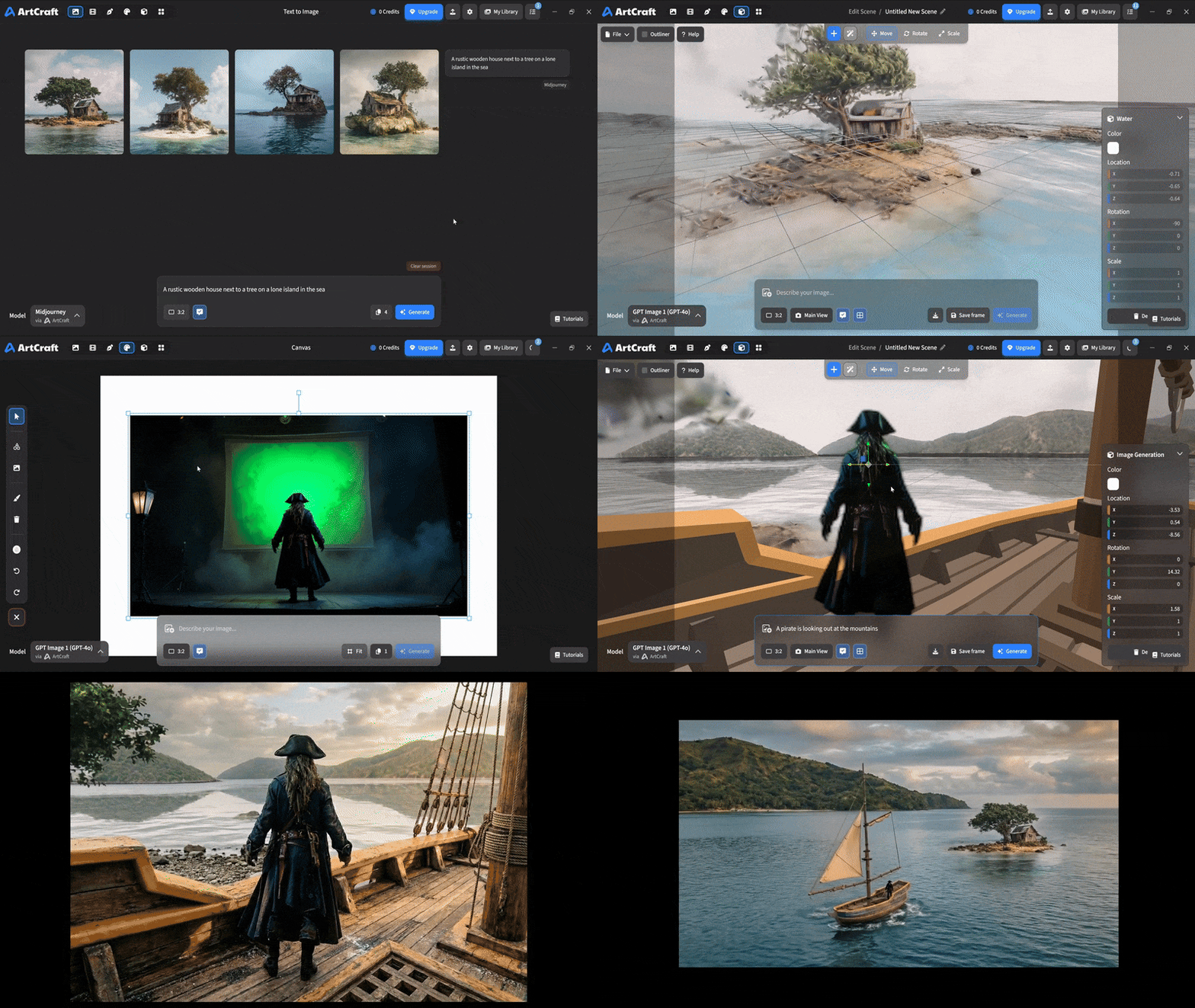
| Mixed Asset Crafting Combine image cutouts, worlds, and 3D meshes in one scene. |
 |
More previews are coming for scene blocking, canvas editing, and scene relighting.
Quick and Easy Prompting
Start with a prompt when you want to explore an idea quickly, then use the canvas and scene tools to refine it.
| Feature | Preview |
|---|---|
| Text to Image Explore ideas across a wide range of image models with a text prompt. |
|
| Prompted Image Editing Describe changes to an image with models such as Nano Banana Pro and GPT Image. |
|
| Canvas Image Editing Use drawing, masks, and inpainting to guide exactly where an image changes. |
|
| Image to Video Animate an image with your choice of video models and generation controls. |
More previews are coming for image inpainting and image ingredients.
Models and Providers Supported within ArtCraft
| Provider | Models and workflows |
|---|---|
| ArtCraft | Images, video, music and sound, 3D meshes, and worlds. Browse the complete model catalog below. |
| Grok | Grok Imagine and Grok Video. |
| Midjourney | Midjourney image generation. |
| Sora | Sora 1, Sora 2, and GPT Image 1. |
| World Labs | Marble world generation with Gaussian splats. |
ArtCraft: the full 62-model catalog
† Currently disabled. ‡ Restricted model; not currently available in the desktop app.
Images (16)
| Family | Models |
|---|---|
| Nano Banana | Nano Banana; Nano Banana 2; Nano Banana Pro |
| GPT Image | GPT Image 1.5; GPT Image 2; GPT Image 2.5 Flare; GPT Image 2.5 Sunburst |
| FLUX | FLUX.1 [dev]; FLUX.1 [schnell]; FLUX 1.1 [pro]; FLUX 1.1 [pro] ultra |
| Seedream | Seedream 4; Seedream 4.5; Seedream 5 Lite; Seedream 5.0 Pro; Seedream 5.0 Pro Ultra |
Video (25)
| Family | Models |
|---|---|
| Seedance | Seedance 1.0 Lite †; Seedance 1.5 Pro; Seedance 2.0 |
| Kling | Kling 1.6 Pro; Kling 2.1 Pro †; Kling 2.1 Master †; Kling 2.5 Turbo Pro; Kling 2.6 Pro; Kling 3.0 Pro †; Kling 3.0 Standard † |
| Veo | Veo 2 †; Veo 3 †; Veo 3 Fast; Veo 3.1; Veo 3.1 Fast; Veo 3.1 Lite |
| Sora | Sora 2 †; Sora 2 Pro † |
| Vidu | Vidu Q3; Vidu Q3 Turbo |
| MiniMax | MiniMax H3; MiniMax H3 Turbo ‡; MiniMax H3 Ultra ‡ |
| Flux | Flux 3; Flux 3 Draft |
Music and sound (5)
| Family | Models |
|---|---|
| Suno | Suno Music; Suno Remix; Suno Sounds; Suno Sample |
| Seed Audio | Seed Audio 1.0 |
3D meshes (11)
| Family | Models |
|---|---|
| Hunyuan 3D | Hunyuan 3D 2.0; Hunyuan 3D 2.1; Hunyuan 3D 3; Hunyuan 3D 3 Sketch; Hunyuan 3D 3.1 Pro; Hunyuan 3D 3.1 Rapid; Hunyuan 3D 3.1 Part; Hunyuan 3D 3.1 Smart Topology |
| Tripo3D | Tripo3D H3.1 |
| Meshy | Meshy 6 |
| Rodin | Rodin 2.5 Fast |
Worlds and Gaussian splats (5)
| Family | Models |
|---|---|
| Marble | Marble 1.0; Marble 1.0 Draft; Marble 1.1; Marble 1.1 Plus |
| TripoSplat | TripoSplat |
Additional provider integrations are planned for Kling, Google, Runway, and Luma. We're also interested in supporting existing subscriptions with aggregators such as OpenArt and Freepik.
Downloads
- Stable releases for Windows, macOS, and Linux
- Latest builds on GitHub (including AppImage, DEB, RPM, Arch, and Flatpak packages)
- Linux packaging notes
- Build from source, including Linux
Documentation
- Development setup
- Linux packaging
- Developer documentation
- Desktop build and development scripts
- Roadmap
- License
License
ArtCraft is dual-licensed under MIT or Apache-2.0, at your option. Copyright (c) 2026 ArtCraft Team and the ArtCraft contributors. Required notices, including third-party material not covered by this license, are in NOTICE.